On this page
- What a Scannable Resume Actually Is
- Your Resume Format Matters More Than You Think
- The Five Formatting Rules That Determine Your Score
- Single-column layout only
- No tables, text boxes, or graphics
- Standard fonts and readable sizes
- Standard section headers
- Submit a text-selectable PDF
- What Breaks ATS Parsing — and the Score Data
- Not All ATS Platforms Are Equally Forgiving
- Keywords Are the Other Half of Scannability
- How to Test Whether Your Resume Is Scannable
- The cursor test
- The copy-paste test
- Run an ATS score
- When Scannable Formatting Matters Less
A scannable resume is one that an applicant tracking system can read without garbling the content. Not beautiful. Not creative. Parseable. That distinction has ended more job searches than most people know.
The short answer: single-column layout, standard fonts, no tables or text boxes, recognisable section headers, and a text layer the parser can actually extract. If you can highlight every word in your uploaded PDF with your cursor, the algorithm probably can too. If you can't — neither can it.
The longer answer covers which ATS platforms are strictest, what exactly breaks parsing, and how to verify yours passes before you apply anywhere. All of that follows.

What a Scannable Resume Actually Is (And Isn't)
"Scannable" has a history. In the early 2000s, physical resumes were fed through OCR (optical character recognition) scanners and stored in databases employers could keyword-search. The formatting rules from that era — plain text, no graphics, no columns — were designed around those machines. Nobody was printing their resume and faxing it to a scanner in 2026. (I assume. I try not to judge.)
In 2026, the term means something more specific: a resume whose text an ATS can extract accurately and map to the right data fields — employer name, job title, date range, skill, education — without corruption.
Modern ATS platforms (Greenhouse, Workday, Lever, Taleo, iCIMS) receive your uploaded file, run it through a text extraction engine, and parse the output into structured data. They're reading text strings, not pixels. Which means the risk isn't a machine misreading your font — it's a parser misinterpreting your layout and mixing your skills into your job titles, or dropping your work history into a field it can't map.
"Scannable" in 2026 means parseably formatted. And that's a narrower target than most resume advice acknowledges.
Your Resume Format Matters More Than You Think
75% of resumes are rejected by ATS before a human reads them, according to Jobscan. That number gets cited everywhere. What gets cited less: the majority of those rejections aren't about qualifications. They're about formatting that a parser couldn't process.
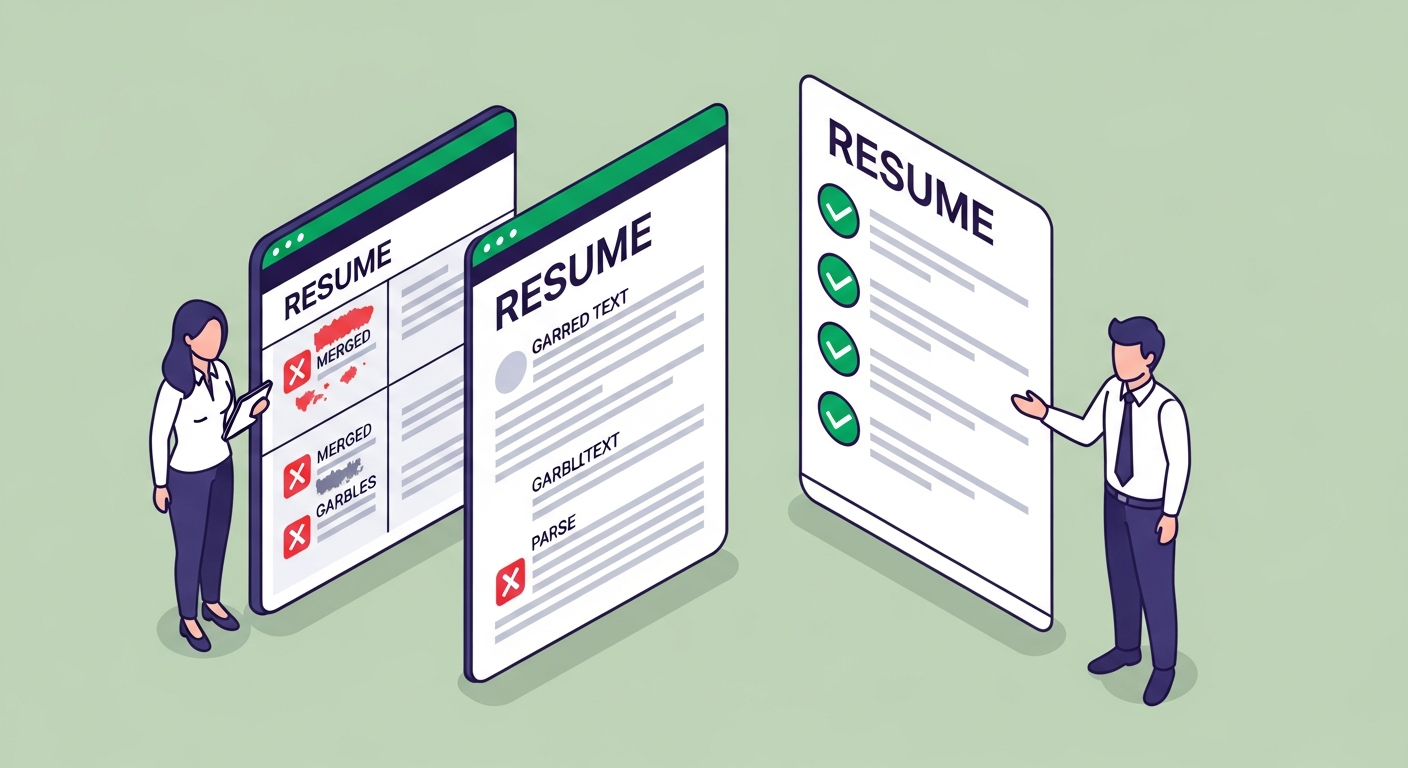
A software engineer with 8 years of experience ran his resume through ATSFixer and received a score of 12/100. His resume was genuinely impressive — two-column layout, skills sidebar on the left, experience on the right, clean visual design with subtle colour coding. The problem: the parser read both columns left-to-right in a single horizontal pass, merging his skills list with his job titles into unsalvageable text. To the algorithm, his employer names, dates, and roles were gone. He looked, to the system, like a blank page with a name at the top.
He converted to a single-column layout. Same job titles, same bullet points, same skills — nothing rewritten, nothing added. New score: 71/100. Interview request that week.
The resume that looks best to a human often scores worst with an ATS. (I'd call this ironic, but the machine didn't design itself to appreciate irony.)
A 2021 Harvard Business School and Accenture study covering 8 million job postings found that 88% of executives acknowledge their ATS filters out qualified candidates. Most of them knew it. Most hadn't changed anything, because reading 250 applications manually wasn't operationally viable for their teams. The system over-filters on purpose — speed is the design goal, not accuracy. Your job is to make the filter work for you.

The Five Formatting Rules That Determine Your Score
1. Single-column layout only
Columns are the most common cause of ATS parsing failure. The issue is structural: when a parser reads a two-column document, it reads horizontally across the full page width. A skills list in the left column gets merged with job titles in the right column, producing text the system can't map to any structured field.
Single column. One reading direction. No exceptions for anything going through an online application portal.
This applies to every form of multi-column implementation: side-by-side sections in Word, design-tool column layouts, multi-column table structures, and sidebar-style resume templates. If there are two vertical channels of text on the page, the parser will merge them. The output will not look like a resume to the recruiter's search system.
2. No tables, text boxes, or graphics
Tables and text boxes in DOCX files exist as a separate XML layer from the main document text. Most parsers skip them, ignore them, or process them inconsistently. If your skills are listed inside a table — even a borderless, invisible-looking table — there's a real probability the algorithm never reads it. If your contact information sits in a header text box, which is the default in many Word resume templates, the parser may see your email address as absent entirely.
Graphics score zero by definition. An infographic showing your proficiency level in Excel, a progress bar for your Python skills, a visual timeline of your career — none of that means anything to a text extraction engine. The word "Excel" in a plain-text skills list does. The bar graph does not.
Most Canva and Pinterest resume templates — the ones with thousands of saves and beautiful screenshots — use exactly these elements. That's not a coincidence. Design tools optimise for visual appeal. ATS parsers optimise for structured text. The template that photographs best is usually the template that scores worst.
3. Standard fonts and readable sizes
Use fonts every rendering environment has installed: Arial, Calibri, Garamond, Georgia, Times New Roman, Helvetica. Body text at 10–12pt, section headings at 14–16pt. Avoid decorative fonts, downloaded brand fonts, or anything that requires a separate install — if the parser's rendering engine doesn't have the font, character substitution happens and your text turns into a row of question marks or rectangles.
This doesn't mean your resume has to look identical to everyone else's. Spacing, whitespace, and simple typographic hierarchy can make a clean single-column layout look professional without relying on unusual fonts that break rendering downstream.
4. Standard section headers
ATS parsers are trained on standard resume section vocabulary. "Work Experience," "Professional Experience," and "Employment History" all map correctly to the experience field. "Where I've Been" will not. "Skills," "Core Competencies," and "Technical Skills" work. "What I Bring to the Table" will confuse the parser and may cause the entire section to fall into an unclassified bucket that the recruiter's search never surfaces.
This isn't convention for its own sake. The parser needs to recognise the section name to know which structured field to map your data into. If it can't identify the section, it can't structure the data, and the recruiter's filter won't surface you even if your content is exactly right.
Use standard headers. The personality goes into your bullet points, not your section names.
5. Submit a text-selectable PDF (usually)
Open your resume as a PDF. Click into the document. Try to highlight individual words with your cursor. If you can select and copy text, the text layer exists and most parsers can read it cleanly.
If you can't highlight anything — if clicking produces nothing or the entire document selects as a single image — your PDF is image-based: a flattened picture of a resume, not a text document. This is the default export from some Canva templates and any resume created by printing and scanning. An image-based PDF scores zero on every ATS platform because there is literally no text for the parser to extract.
PDF is the right format for most modern platforms — Greenhouse, Lever, Workday, and iCIMS all handle text-selectable PDFs cleanly. Use DOCX only when the job posting explicitly requests a Word file, or when you're applying through an older legacy HRIS that lists DOCX as required.
Free ATS Score Check
Your result looks like this —
get yours in 30 seconds.
Drag & drop your resume here
PDF or Word · max 10 MB
Results in under 30 seconds · no sign-up required

What Breaks ATS Parsing — and the Score Data to Prove It
ATSFixer runs test resumes through Greenhouse, Lever, Workday, Taleo, and iCIMS every week to measure exactly what formatting choices do to extraction quality. The failure patterns are consistent across platforms:
- Two-column layouts — left-to-right extraction across the full page merges both columns into a single scrambled line of text
- Document headers and footers — contact information placed in the header section of a Word document, the default location in many templates, is invisible to most parsers, which process the main body only
- Special bullet characters from decorative fonts — bullets that render correctly in the original font appear as question marks or empty boxes after extraction, breaking the formatting of every bullet in the document
- Image-based PDFs — created by scanning a printed document or exporting as a flattened image from a design tool; no text layer exists to extract
- DOCX text boxes — a separate XML element from the main document body; the majority of parsers ignore them entirely
ATSFixer data shows that 1 in 3 resumes submitted through Workday are corrupted during parsing due to columns, tables, or text boxes. That's not an edge case — that's a third of applicants starting the process already at a structural disadvantage, before a recruiter has made any judgment about their qualifications or experience.
The recruiter isn't filtering those people. The ranking system sorted them before she arrived. She opens Greenhouse, sorts by score, reads the top 15. Below a score of roughly 65 out of 100, the list is too long to read past. You're not being evaluated — you're being not seen. Fixing that is a formatting problem, not a qualifications problem.

Not All ATS Platforms Are Equally Forgiving
This is the part most scannable resume guides skip. It matters more than the formatting rules themselves.
There are five major ATS platforms, and they are not equally strict about what they can parse:
Greenhouse and Lever — dominant in tech startups and growth-stage companies, used by 7,500+ and thousands of companies respectively — have relatively lenient parsers. A minor formatting issue, like a single-row table in your skills section, might still extract adequately. These platforms were built for modern recruitment workflows and handle a wider range of document formats.
Taleo (Oracle) and older iCIMS installations — common at banks, healthcare systems, government agencies, and legacy enterprise companies — have the most restrictive parsers in the industry. A table in your skills section that Greenhouse processes without complaint will score zero structured fields on Taleo. Headers and footers that Lever handles gracefully will be invisible to Taleo's extraction engine. Taleo is also the platform where the two-column failure is most catastrophic — it produces complete nonsense output rather than a partially-correct extraction.
Workday, used by 45%+ of Fortune 500 companies, sits in the middle. It handles text-selectable PDFs reliably but is stricter than Greenhouse about multi-section layouts and non-standard section headers. SAP SuccessFactors, dominant at large European-headquartered organisations, behaves similarly to Workday.
The practical implication: if you're applying to large enterprise companies — Fortune 500, healthcare systems, financial institutions, government agencies — optimise for Taleo-level strictness. Every rule above applies without exception. If you're targeting tech startups and mid-market growth companies, you have marginally more flexibility on some details, though not enough to justify a sidebar or a multi-column layout.
If you're not sure which system a company uses, treat the strictest standard as the default. A resume that passes Taleo will pass Greenhouse. The reverse is not reliably true.

Keywords Are the Other Half of Scannability
Format gets your resume extracted. Keywords get it surfaced.
A resume can be perfectly formatted — single column, standard fonts, text-selectable PDF — and still score low because it doesn't contain the exact keywords the job description uses. Most ATS platforms do exact-match keyword scoring. "Stakeholder communication" and "cross-functional collaboration" mean the same thing to a human and score nothing equivalent to a parser. The system searched for "stakeholder communication," found zero exact matches, and ranked accordingly. She changed two phrases. Got the interview. Got the job.
According to Jobscan analysis of over 1 million resume scans, job seekers who tailor their resume to each application are 3× more likely to get an interview. That's not a marginal lift — it's the difference between the algorithm surfacing you and filing you in the pile nobody reads past position 15.
The rule: mirror the job description's exact phrasing. If the posting says "project management," your resume should say "project management" — not "project delivery," not "end-to-end execution." Those phrases are fine as context inside bullets, but the keyword match needs to be exact. For a complete breakdown of how to identify the right keywords and where to place them, the guide to resume keywords and ATS optimization covers the mechanics in detail.
Placement matters too. Most ATS platforms weight a dedicated skills section separately from the full-text search. A keyword appearing in your skills section and in a work experience bullet scores higher than the same keyword appearing only once in the body. ATSFixer data shows resumes with a dedicated skills section score an average of 10–15 points higher than equivalent resumes without one. The skills section is doing more work than most people give it credit for — and most people either skip it entirely or fill it with "team player" and "results-driven," which the algorithm learned to ignore a long time ago.

How to Test Whether Your Resume Is Scannable
Three checks. Run all three before submitting to any position that goes through an online portal.
The cursor test
Open your resume PDF. Click into the document and try to highlight a single word. If you can select individual words, the text layer exists and parsers can read it. If nothing highlights — if clicking produces no cursor at all — your PDF is image-based. Rebuild the document in Word or Google Docs, export as a new PDF, and confirm the text layer is present before applying anywhere.
The copy-paste test
Select all text in your resume (Ctrl+A or Cmd+A), copy it, and paste it into Notepad or any plain text editor. Read through the output in sequence. Your name and contact information should appear at the top. Work experience should follow in chronological order, with employer names, job titles, and dates intact and in the right positions. Skills should read as a coherent list.
If the output is scrambled — skills mixed into job titles, dates detached from employer names, unrecognisable character sequences where your bullet points were — the parser will produce the same scrambled output. What you see in plain text is close to what the ATS database contains about you. Read it like a recruiter whose search filter just returned your name. Does it make sense?
Run an ATS score against a real job description
The copy-paste test catches layout failures. It doesn't catch keyword gaps, which are the second most common cause of low scores after formatting. To check both — format and keyword match — against a specific job description, use an AI resume checker built for ATS evaluation. Paste the job description alongside your resume, and the tool will flag missing exact-match keywords, formatting problems, and the specific changes most likely to move your score. That's the check that actually maps to what the recruiter's system is doing.

When Scannable Formatting Matters Less
Honestly — not everywhere.
Most companies under 50 employees don't use an ATS at all. The resume goes to a person, not a system. For those applications, a clean, well-designed document that reads well to a human matters more than strict ATS format compliance. A layout with subtle visual structure won't hurt you when there's no parser involved — and might genuinely help, because it signals attention to presentation.
Referrals change the calculus too. LinkedIn data shows 70% of roles are filled before they're publicly posted — through referrals, internal candidates, and recruiter networks. When you're referred directly to a hiring manager, your resume is reviewed by a person first. Clarity and content quality matter as much as parser compatibility in those cases.
The rule of thumb: if you're submitting through an online portal or a job board, an ATS is almost certainly processing your application. Format accordingly. If you're sending directly to a named person, optimise for human readability — and still avoid columns and tables, because they don't add anything a clean layout can't, and they look cluttered to humans too.
For a complete picture of how ATS scoring and ranking mechanics determine whether the recruiter ever sees your name, read the full breakdown of how ATS systems work. If you want to compare which resume format gives the best ATS compatibility across different career situations, the guide to resume format types covers chronological, functional, and hybrid layouts with real score data.
If you want to know what the algorithm thinks of your resume right now, paste it into ATSFixer. Score in 30 seconds. Specific fixes included. Unlike the recruiter who sorted your name into position 47 and never scrolled that far — we'll actually get back to you.
Related from ATSFixer
Frequently Asked Questions
A scannable resume is formatted so an ATS can extract its text cleanly and map it to the right data fields — name, employer, job title, dates, skills. The term originally referred to OCR-scanned paper resumes, but in 2026 it means a digital file whose layout does not corrupt parser output. Single-column format, standard fonts, no tables or graphics, and a text-selectable PDF are the core requirements.

Jordan Marcus
Senior Career Strategist
Jordan has reviewed 4,000+ resumes and coached candidates into roles at Google, Stripe, and McKinsey. She writes about the mechanics of ATS and what actually gets people interviews.