On this page
- What Is the Reverse Chronological Resume Format
- Why ATS Systems Score This Format Highest
- The Structure: What Goes Where and Why It Matters
- When to Use the Reverse Chronological Format
- When This Format Works Against You
- The Formatting Mistake That Tanks Your Score Anyway
- Handling Multiple Roles at the Same Company
The reverse chronological resume format is not complicated. List your most recent job first, work backward to your oldest role, and you've done it. (I realize writing a guide to this sounds like explaining how a door handle works. It would be unnecessary if so many applications processed through Workday didn't break before a recruiter ever saw them.)
The format itself isn't the problem. It's the layout inside the format that breaks applications — two-column designs, sidebars, decorative headers that turn a parseable document into garbled text before the algorithm assigns it a score.
According to Jobscan's research, 75% of resumes are rejected by ATS before a human reads them. Most of those rejections aren't about qualifications. They're about the document not being readable in the way the parser expects.
This guide covers what the reverse chronological format actually is, why ATS systems score it highest, the correct section structure, when to break from it, and the formatting decision that tanks scores even when the job order is right.

What Is the Reverse Chronological Resume Format
The reverse chronological resume format organises your work experience section with your most recent position at the top and your oldest position at the bottom. Each entry includes your job title, company name, location, dates of employment, and bullet points describing what you actually did there.
The "reverse" refers specifically to the work experience section — not the whole resume. Your contact information sits at the top regardless of format. Your summary follows it. Your skills section, education, and optional sections like certifications can appear in different orders depending on your career stage. Only the work experience section runs newest-to-oldest.
This distinguishes it from two alternatives:
- Functional format — Groups experience by skill category rather than employer. Designed for career changers and people with gaps, but it often backfires with ATS systems because parsers can't extract job titles and dates in a readable sequence.
- Combination format — Leads with a skills summary or core competencies block, followed by a condensed reverse chronological work history. Common for mid-career professionals changing industries, where leading with skill clusters makes more sense than leading with a job title that signals the wrong field.
The reverse chronological format is the most widely used resume format for a reason: it's the format applicant tracking systems were designed to parse. The standard exists because the tool was built around it, and that tool processes 98% of Fortune 500 hiring. Whether or not you find this annoying is irrelevant to the algorithm. (The algorithm, it should be noted, has no opinions about your feelings. It has opinions about your column layout.)
For a complete breakdown of all resume format types and which one scores best in different situations, see our guide on types of resume formats and when to use each one.

Why ATS Systems Score This Format Highest
ATS systems parse resumes by extracting structured data — job titles, employer names, dates, education, and skills — then scoring those fields against the job description's required terms. The parsing process reads your document top-to-bottom, field by field, in a linear pass.
Reverse chronological formatting aligns directly with how the parser expects data to arrive. When your work experience runs newest-to-oldest, the most relevant recent role hits the parser first. It extracts your current title, maps it to the required experience level, pulls the dates to check tenure requirements, and moves on. The structure is predictable, and predictable structures parse cleanly.
Functional formats disrupt this process. When experience is grouped by skill category rather than employer, the parser can't extract job titles in a clear sequence. Dates become ambiguous. The system misattributes experience fields, scores inconsistently, and produces a lower overall score even when the candidate's actual qualifications are stronger.
98% of Fortune 500 companies use an ATS, according to Jobscan. A 2021 Harvard Business School and Accenture study of 8 million job postings found that 88% of executives acknowledged their ATS filters out qualified candidates. The filter isn't sorting by qualifications. It's sorting by which documents it can read.
Here's the unpopular opinion: a functional resume designed to hide employment gaps often scores worse than an honest reverse chronological resume with the gap explained directly. The format people think is protecting them frequently does the opposite. The algorithm doesn't have grace for ambiguity — it has a parser that either finds a job title and a date or it doesn't.
For a deeper look at how ATS parsing and scoring works across specific platforms, see our full breakdown of how ATS systems filter and rank candidates.
The Structure: What Goes Where and Why It Matters
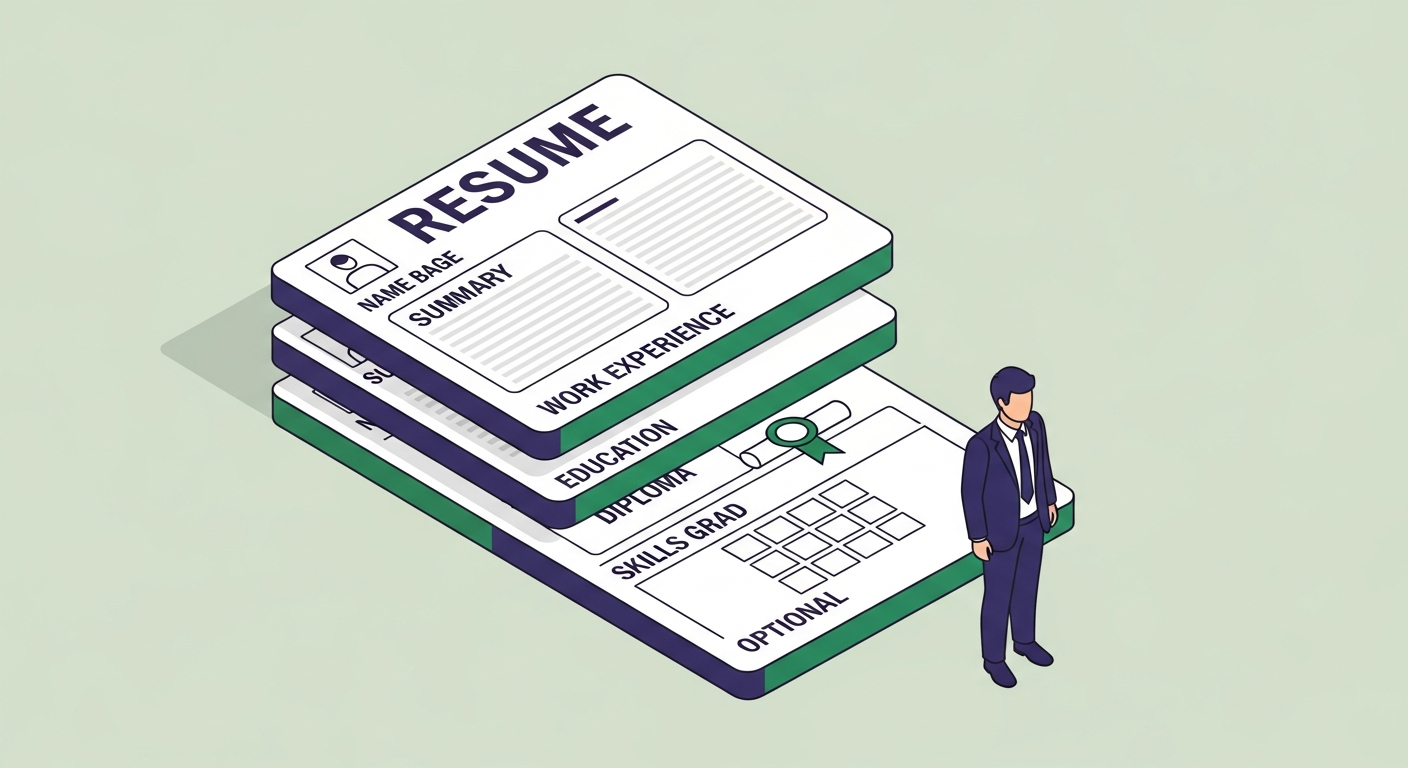
The reverse chronological format follows a specific section order. That order isn't arbitrary — it reflects what ATS systems weight most heavily and what recruiters look for first in their 7.4-second scan. (That's the average time a recruiter spends on an initial resume review, per the Ladders eye-tracking study. Seven point four seconds. File under: reasons formatting decisions actually matter.)
1. Contact information
Name, phone number, professional email, LinkedIn URL, and city and state. No full street address. No photo. Your name should be the largest text on the page. Contact information belongs in the main body of the document — not in a formatted header block or in a Word document's header section, both of which some parsers skip entirely.
2. Professional summary
Two to four sentences that mirror the primary keywords in the job description you're targeting. This section scores twice: once as a dedicated summary field, and once as part of the full-text keyword scan. Generic summaries ("results-driven professional seeking opportunities to contribute") score the same as blank space. Write it for the posting you're applying to, not for a hypothetical future reader.
3. Work experience
Your roles, most recent first. Each entry: company name, your title, location, dates in a consistent format. Below each: three to six bullet points per role, leading with strong action verbs, including specific metrics where you have them. This is the section ATS parsers weight most heavily. It's also where human recruiters spend the most time in that 7.4-second scan. Both audiences want the same thing: clear, specific, keyword-matched bullets with numbers where possible.
For details on how to structure each resume section effectively, see our guide on which resume sections matter most to ATS systems.
4. Education
Below work experience for anyone with more than two to three years of experience. Above work experience for recent graduates — in which case, the most recent degree still appears first within the section. The structure rule (newest at top) applies inside each section, not just to the overall ordering.
5. Skills
A dedicated skills section is where ATS parsers extract structured keyword data. Hard skills, technical tools, certifications, and relevant software belong here. Soft skills listed in a skills section score close to nothing on most platforms — the algorithm has encountered "team player" on ten million resumes and learned to assign it the same weight as background noise. List what can be verified: platforms, frameworks, tools, credentials.
Resumes with a dedicated skills section score an average of 10–15 points higher on ATS screening than equivalent resumes without one, according to ATSFixer internal data. It's the most consistently under-used section on most resumes and the highest-ROI section to fix.
6. Optional sections
Certifications, professional development, volunteer work, publications, language proficiency. Add them when they're directly relevant to the target role. Certifications especially: if one appears in the job description, name it explicitly in your resume — either in a dedicated Certifications section or prominently in the skills section. The exact phrase the employer used is the one that scores.

When to Use the Reverse Chronological Format
This format works for most job seekers in most situations. Specifically:
Experienced professionals with a steady career history. If you've worked for two to five employers over ten or more years and each role logically built on the previous one, reverse chronological is the natural choice. Your most recent and highest-level experience — the thing both the ATS and the recruiter want to see first — is front and centre.
Anyone applying to a company that uses ATS. Which is 98% of Fortune 500 companies and most companies with structured online application portals. If you're submitting through a job board or a company careers page, an ATS is processing your resume before a human sees it. Reverse chronological is the format it was built to read. Using anything else at a large employer optimises for a reader who doesn't see your document first.
Career progressors showing promotions. If you've moved up at the same company — different titles, different date ranges, same employer — reverse chronological handles this better than any other format. You can show multiple roles under one company header, demonstrating progression without confusing the parser. More on this in the last section.
Recent graduates. The format works here too. Your education section moves above work experience. Your internships, student projects, and relevant part-time work go in the work experience section. The structure stays the same — the section order adjusts for career stage, not format type.
If you want to verify that your resume is formatted correctly for ATS before submitting it, paste it into ATSFixer's free score checker. It shows you exactly where the parser is losing data and what score the keywords produce against a target job description.
Free ATS Score Check
Your result looks like this —
get yours in 30 seconds.
Drag & drop your resume here
PDF or Word · max 10 MB
Results in under 30 seconds · no sign-up required

When This Format Works Against You
Three situations where the reverse chronological format creates friction:
Significant unexplained employment gaps. A 16-month gap sits visibly at the top of your work history in this format and draws attention the moment a recruiter opens the file. The gap itself isn't disqualifying — the unexplained one is. "Career Break — Family Caregiving, 2023–2024" names the gap and closes it. Blank white space between roles invites the recruiter to fill in the worst interpretation of what happened there.
Career changes where recent experience misaligns with the target role. If you spent eight years in operations and are applying for a product management role, leading with operations job titles signals the wrong field before a recruiter reads a single bullet point. A combination format — a prominent skills block first, followed by a condensed work history — reframes your experience toward the target before ATS scoring happens.
Freelancers with many short-term contracts. Listing fifteen three-month engagements in strict reverse chronological order looks like instability to both parsers and humans. Grouping them under a freelance umbrella heading ("Freelance Marketing Consultant, 2020–2024") with selected client highlights reads more cleanly.
The important caveat about functional resumes: Functional formats, designed specifically for these situations, often score worse on ATS than a well-structured reverse chronological resume with the same underlying issues. The parser can't extract job titles and dates cleanly from a skills-grouped format, and scores drop even when the content is stronger. If you're in any of these situations, a combination format or a reverse chronological resume with a reframing summary usually outperforms a pure functional format on ATS.
For a full comparison of which format scores best in different career situations, see our breakdown of resume format types and ATS scores.
The Formatting Mistake That Tanks Your Score Anyway
You can use the reverse chronological format correctly — jobs in the right order, dates accurate, solid keyword coverage — and still score 12 out of 100.
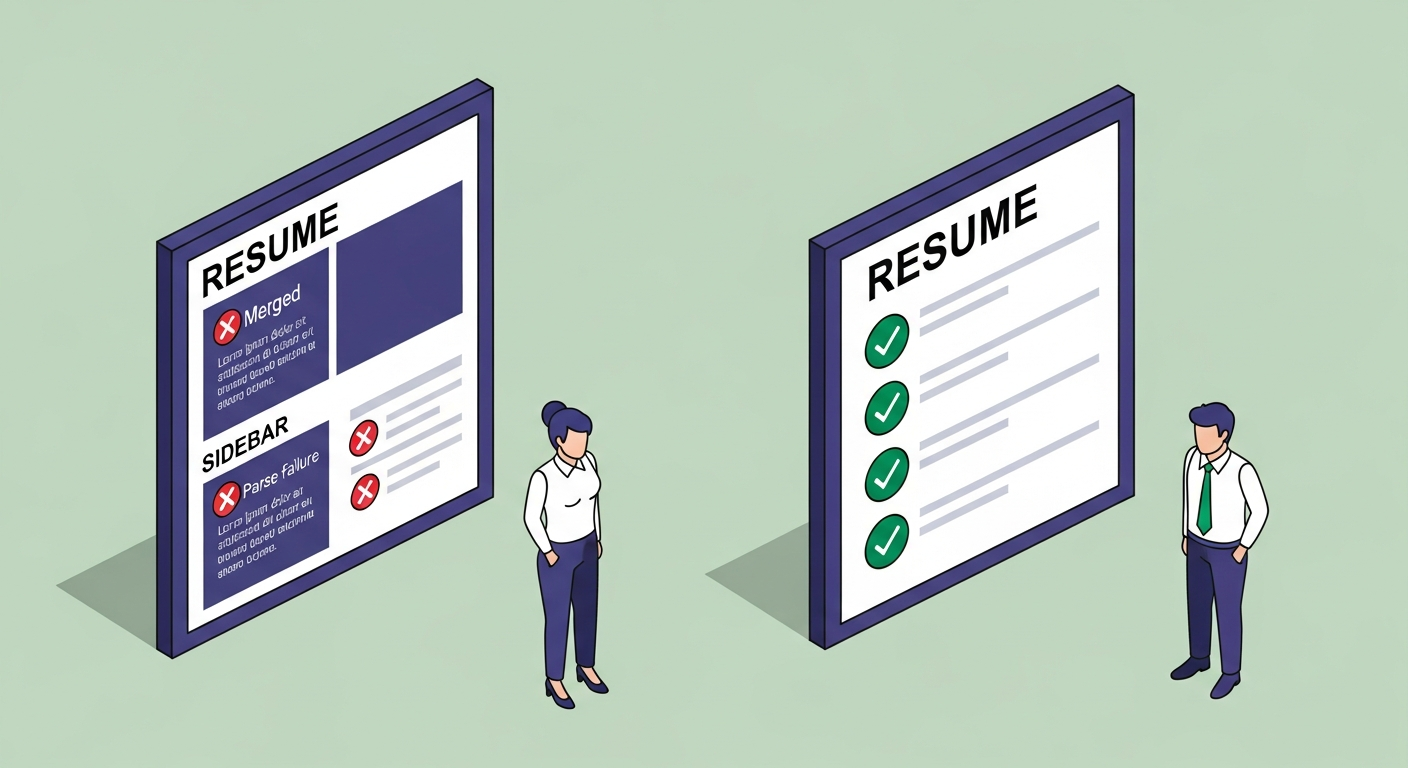
A software engineer with eight years of experience submitted a beautifully designed two-column resume: skills on the left sidebar, experience on the right. His ATS score: 12/100. The parser read both columns left-to-right in a single pass, merging his skills list with his job titles into garbled text. The system couldn't extract his employer names, titles, or dates. He looked, to the algorithm, like a blank page.
He converted to single-column. Same jobs, same order, same bullet points — he just removed the sidebar and moved skills below experience in a clean vertical list. New score: 71/100. Interview request that week. Same eight years of experience. Different document architecture.
ATSFixer's internal testing found that 1 in 3 resumes submitted through Workday are corrupted during parsing due to columns, tables, or text boxes. The reverse chronological ordering is irrelevant once the document structure breaks the parser's ability to read continuous lines of text.
What breaks ATS parsing:
- Two-column layouts and sidebars. Parsers read left-to-right in a single pass. A sidebar merges its content with the adjacent column, producing garbled output the system cannot categorise.
- Tables used to organise experience or skills. Content inside tables is often invisible or misread. A skills grid formatted as a table may not extract as keyword data at all.
- Text boxes. The parser reads around them, producing gaps in your structured data where that content should have appeared.
- Contact information in document headers or footers. Some parsers skip header and footer content entirely. Name, phone, and email belong in the main body of the document.
- Decorative elements, icons, and graphics. These produce unreadable character strings in parsed output. The stethoscope icon next to your name, the small chart beside your skills — both show up as symbol strings in the ATS data field.
- Non-standard fonts. Stick to Calibri, Arial, Georgia, or Garamond. Decorative fonts sometimes fail to convert cleanly to the text encoding the parser uses.
What doesn't break parsing: single-column, top-to-bottom layout; standard fonts at 10–12pt; plain bullet points (not custom icons); contact information in the main body; PDFs exported from a clean Word or Google Docs file.
The format instruction is about data ordering. The layout instruction is about document architecture. Most resume guides give you one without the other. You need both. For a full checklist of what makes a resume ATS-readable, see our guide on how to build a scannable resume.

Handling Multiple Roles at the Same Company
One scenario the reverse chronological format handles better than any other — and that most guides skip — is showing promotions and role changes at the same employer.
If you've held multiple titles at one company, you have two presentation options:
Option 1: Stacked entries under one company header
The company name appears once as a block header. Each title gets its own line with its own date range, followed by its own bullet points beneath it. The result:
Acme Corporation | New York, NY | 2019–Present
Senior Product Manager | 2022–Present
Product Manager | 2019–2022
The stacked format shows progression clearly, prevents the company name from appearing in duplicate, and reads naturally to a human reviewer. On modern ATS platforms — Greenhouse, Lever, and current Workday — it parses correctly.
Option 2: Separate entries for each title
Each role gets its own full entry block with the company name repeated.
Senior Product Manager | Acme Corporation | 2022–Present
Product Manager | Acme Corporation | 2019–2022
Separate entries are more reliable on older ATS parsers — specifically Taleo and legacy iCIMS — which parse each block as a distinct record and may not handle the stacked-header format correctly. If you're applying to large enterprises, healthcare systems, government agencies, or financial institutions (all heavy Taleo users), separate entries are the safer choice.
Rule of thumb: if the company uses Greenhouse, Lever, or current Workday (common at tech companies and growth-stage startups), stack the entries. If you're applying to a large enterprise with legacy HR infrastructure, keep them separate.
Either way, use a consistent date format across all entries. "Jan 2022 – Present" next to "2022–Present" next to "January 2022 to Present" in the same document can confuse older parsers. Pick one format and keep it through the whole document. The specific format doesn't matter much. The consistency does.
The reverse chronological format has been the standard long enough that it's become the path of least resistance — for the algorithm and for the recruiter. The interesting question isn't whether to use it. It's whether the container you've built for it can actually be read.
If you're not sure, paste your resume into ATSFixer. We'll tell you what the algorithm actually thinks of your document — not what you hope it thinks, what it scores. Unlike the last ATS that quietly buried your application, we'll explain what happened.
Related from ATSFixer
Frequently Asked Questions
The reverse chronological resume format organises your work experience section with your most recent position at the top and your oldest at the bottom. All other sections — contact, summary, skills, education — can be ordered differently depending on career stage, but the work experience section specifically runs newest-to-oldest. It is the most widely used resume format because ATS systems were built to parse it, and 98% of Fortune 500 companies use ATS to process applications.

Jordan Marcus
Senior Career Strategist
Jordan has reviewed 4,000+ resumes and coached candidates into roles at Google, Stripe, and McKinsey. She writes about the mechanics of ATS and what actually gets people interviews.